"How to download RAM? (For Real!)"
DISCLAIMER: This is a joke. Please do not try this at your computer.
Introduction and Motivation
The RAM prices are increasing very rapidly for the past few months. I was thinking about how to get more RAM for my computer without spending a lot of money. Then I thought, why not download RAM from the internet? After all, everything is digital nowadays, right? So, after talking with some friends (ChatGPT and Gemini), I found a way to download RAM. Here's how you can do it too!
What you need:
- A computer with internet access
- A Linux distribution (I'm using Debian in a virtual machine for this experiment)
- An internet cloud storage account (like Google Drive, Dropbox, etc.)
- Patience.
What you get:
- More RAM (Theoretically)
- A fun experience (Definitely)
Here's the initial setup of my computer before downloading RAM, scraping by with only 4GB of RAM:

Steps to Download RAM
We ask the question to ourselves, what is RAM really? RAM is a type of computer memory that is used to store data temporarily while the computer is running. So we need to find a way to store data temporarily on cloud storage. Here's how we can do it:
Step 1: Sacrifice a Cloud Storage Drive
First, you need to sacrifice a cloud storage drive. Create a new cloud storage account and dedicate it to be used as RAM. Make sure that this storage is empty. For this example I will use a Google Drive account.
Step 2: Mount the Cloud Storage as a Filesystem
There is a tool called rclone that allows you to mount cloud storage as a filesystem. You can install it using the following command:
sudo apt-get install rclone
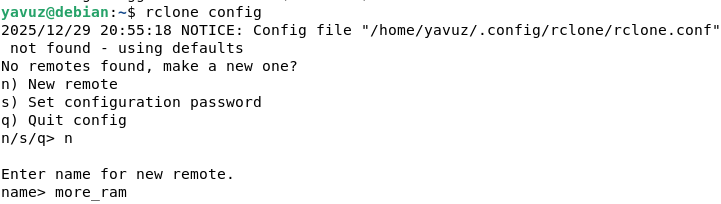
After installing rclone, you need to configure it:
rclone config
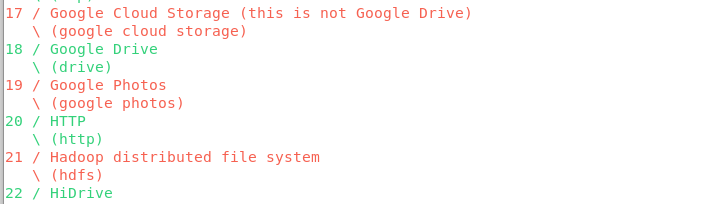
Follow the prompts to set up a new remote connection. Once configured you should see something like this:
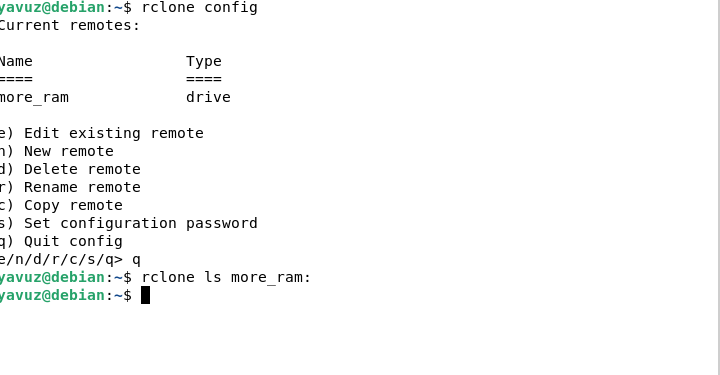
Step 3: Create a Mount Point
The hard part is over. Now we need to create a mount point:
mkdir ~/cloud_ram
Mount the cloud storage:
rclone mount more_ram: ~/cloud_ram --vfs-cache-mode writes &
Create a swap file on the mounted cloud storage:
dd if=/dev/zero of=~/cloud_ram/swapfile bs=1M count=4096
Swap it on:
sudo mkswap ~/cloud_ram/swapfile
sudo swapon ~/cloud_ram/swapfile
Plot Twist: Reality Strikes Back
I wish I could say this was the triumphant end of our RAM-downloading journey. Spoiler alert: it's not. As I was writing this very blog post, following along with my own brilliant instructions, I hit a wall. A kernel-shaped wall, to be precise.
The Linux kernel refused to cooperate with network-based swap files. I wasn't successful despite trying various workarounds — the unreliable network latency and speed made this dream impossible. The last state of the system is below.
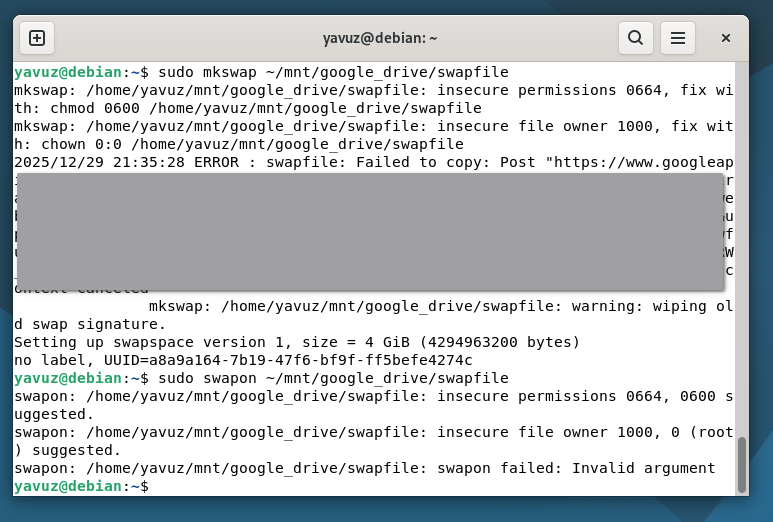
Alas, our journey here with downloading RAM has come to an end. I couldn't achieve the desired outcome but I had fun trying. As for why you shouldn't try this at home:
- Swap is not RAM. Using swap space is significantly slower than actual RAM, especially when located on a network drive. This can lead to performance issues and system instability.
Step 4: Contemplate Life Choices
After realizing that downloading RAM is not feasible, take a moment to contemplate your life choices. Maybe the real treasure was the friends we made along the way.
Conclusion
Don't try to download RAM.